

Google recently released their first major Analytics upgrade since 2013... But what has changed, and what should businesses do? Don’t worry, we’ve got you covered. We’ll be going over what actions you, as a website owner, need to take.
Jump to:
- What exactly is Google Analytics 4?
- Why install analytics at all?
- What’s new about Google Analytics 4?
- What do website owners need to do?
- Will UA be discontinued?
- Can I just install it and leave it?
- What to do if you get stuck or don’t want this hassle?
- To conclude…
What exactly is Google Analytics 4?

UA was its predecessor
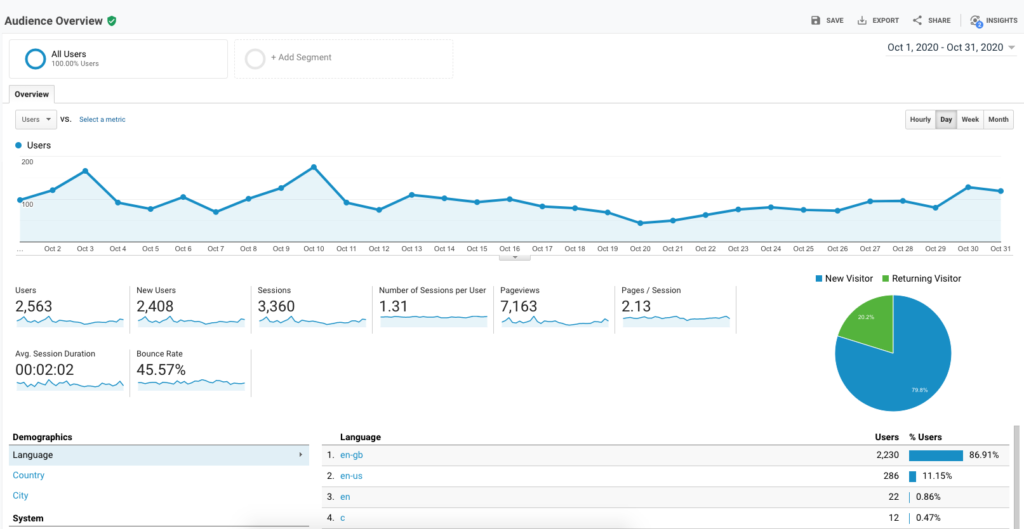 For those of you who need a reminder about what Google Analytics is, it’s a web analytics service offered by Google that tracks and reports website traffic, currently as a platform inside the Google Marketing Platform brand. It’s incredibly popular for a reason and is widely accepted as the best analytics tool out there for business owners to attain data on the effectiveness of their website. The existing product, Universal Analytics (UA), was basically Google’s third succession of its analytics software. UA has been standard practice in being able to get Analytics on a website for many years, so Google releasing a new version is a very exciting development! As a digital marketing agency, we’re always looking for the next exciting update and this one really did tick all the boxes!
GA4 is the one to watch

Google Analytics 4 was released in November 2020 after being available in beta since the end of July 2019 under the name ‘Web + App’. It’s important to remember that this is not just an update, but a new system entirely. It’s also important to note that it can be run alongside your existing Universal Analytics property as well (don’t worry, we’ll go into this in more detail later).
Why install analytics at all?

There are so many reasons why you should install analytics if you haven’t already; here are just a few of them.
1. Referrals
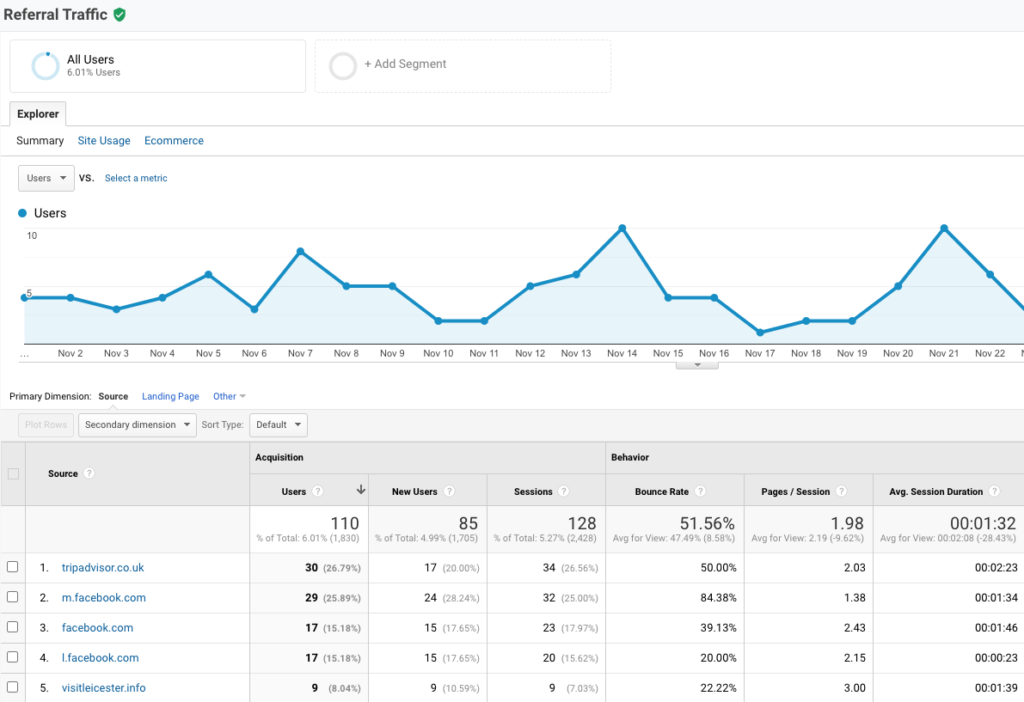 This feature means that you can clearly see where your visitors are coming from, which makes it extremely easy to work out which marketing channel is working best for you. For example, if your visitors are all coming from Instagram, then you can make a decision about how you want to spend your time and money on other platforms. If in doubt, you can always ask your friendly neighborhood digital marketing agency for their advice (that’s us).
2. Most visited pages
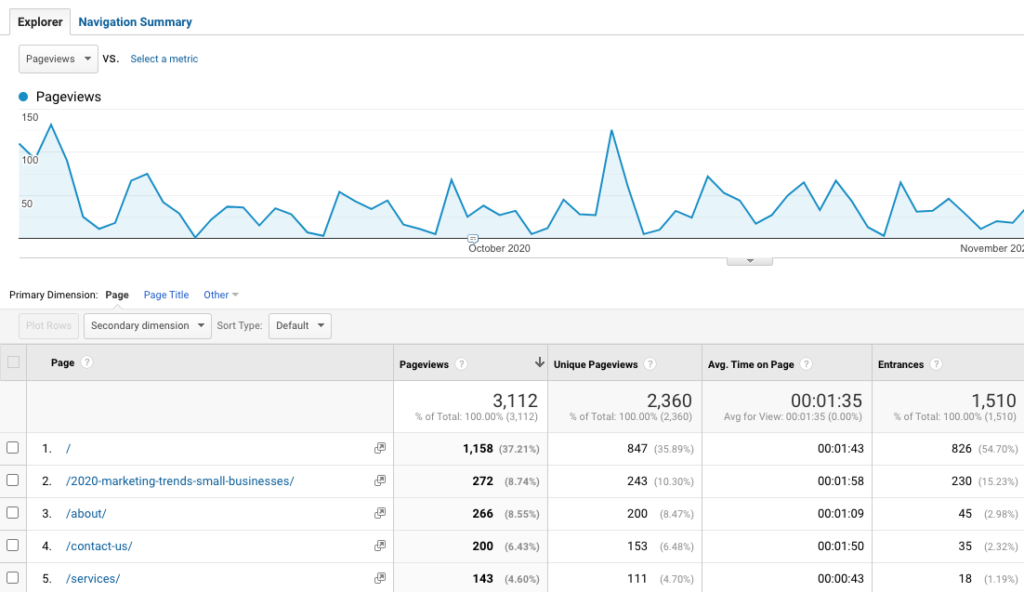 The data you get from this feature means that you can see which pages are most visited by your users. Using this data, you can make edits to improve the user journey and conversion rate. If there is a page that isn’t doing so well, you can ask your team to figure out why that is and to make the improvements needed.
3. User demographics
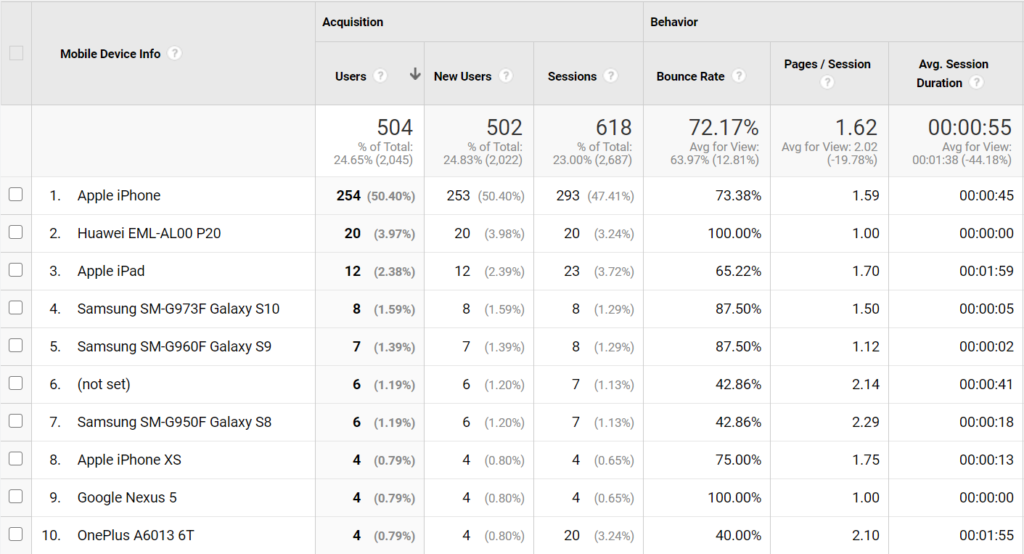 This is a great feature that means that you’ll be able to clearly see where your users are from geographically, as well as if they primarily use a desktop, tablet, or mobile device to access your site. This also means that you’ll be able to optimise your layout and content to work on the more popular devices.
In our opinion, it’s a no brainer
Here at Insight, we recommend that EVERY business website has some form of analytics installed. Otherwise, you’re working blind when it comes to investing time and money into any marketing effort (and that’s just a waste of your time). Google Analytics is a free tool, so there’s no real reason not to install it. So, if you haven’t got analytics on your website yet, keep reading to find out how, and which option you should install.
What’s new about Google Analytics 4?

Google has redesigned its software around what’s most useful to business owners and marketers like ourselves. The internet has progressed a great deal in just a few years and therefore, the demands from website owners and users have changed. Over the years, Analytics has had to adapt to a changing landscape so it’s about time for a new development. As a team, we’ve been experimenting with the new platform to find out what it has to offer, so here are a few of the biggest developments.
1. Page views vs events
 The first major development is that Google has changed the way data is gathered and calculated in order to make the information about how users actually browse a web page more accurate. One of the other biggest differences in GA4 is in how your user’s visits to the website are counted. In UA, users were tracked through ‘page views’ (when they first access the page on your website), but in GA4, by default, users are tracked through ‘events’, such as link clicks, video views, or PDF downloads. This is a much more insightful story of your users.
2. Cross-device tracking
Another major benefit is the change in the way that Google Analytics views a ‘user’. It’s safe to say that we all probably own several devices which we use to browse websites, whereas back when UA was created, we were more likely to browse the web on a single laptop or computer. In other words, Google Analytics 4 is more sophisticated in the way that it can track users across different devices. For example, the user might visit your website on a smartphone whilst on the go, then visit on a tablet or laptop later to continue their evaluation. Previously in UA, Google usually counted this as two separate users by default, whereas GA4 is more accurate at identifying users across multiple devices.
3. AI Insights
Another major development is that Google has vastly increased its AI features. This means that Google Analytics can do a lot of the guesswork for you, rather than you having to click through report after report trying to find answers you’ve been looking for (we’ve all been there!).
4. Privacy
Finally, the way Google Analytics 4 manages privacy for its users is more in line with the direction the web is going: cookie-free. As the web matures to be less and less reliant on cookies, GA4 will be able to keep pace. We’re excited to see this kind of development as privacy is one of our main priorities when it comes to our project work.
What do website owners need to do?

The long and the short of it is that although Google Analytics 4 is now Google’s default analytics option, we are keeping UA as our primary analytics source for our clients for the time being. It’s still early days and it lacks many of the core features UA has, although Google intends to continue releasing features. That said, go and turn on Google Analytics 4 right now! The sooner you start building data, the earlier you can use it to start gaining useful insights (as soon as Google releases more features to the extent that GA4 takes over as the more powerful tool). When you create a Google Analytics 4 property, it starts with a blank slate meaning that there’s no data. It will not inherit any data from your UA property, so open it as soon as you can to get that data flowing. Otherwise, the later you open it, the less data you’ll have. Having turned on GA4 for a few different clients, each at different stages of analytics sophistication, we wanted to highlight the best course of action for different contexts. You can use Google’s Tag Assistant extension to check what analytics tracking codes you’ve got installed. Here’s what to do if…
…you already have Universal Analytics set up on your site
This is great news! It means that you’ve already been collecting data. But don’t remove your UA property, just keep this running as it always has been. The next thing you need to do is to follow Google’s steps on ‘upgrading’ to Google Analytics 4 (you can always give us a call if you’re struggling with this). Google calls this an ‘upgrade’ but all this actually does is creates a parallel property within your analytics account. This means that it lives within the same account as your UA property but as a separate area. Here’s a question for you; have you optimised your UA and GA? Speak to us about this because your data could be inaccurate if you don’t set up things like internal IP address filters. Don’t worry though, we can help you as it is what we do best!
…you have no Google Analytics on your site whatsoever
First things first, set up both UA and Google Analytics 4 in parallel on your site. You should get onto this pronto so that you can start collecting all the data that your business needs! Google will install Google Analytics 4 by default now, so do that, and then install UA as well. The chances are that UA may be the best platform to use for a few months yet, but you should still open your Google Analytics property to start pulling through the data. If you have any questions at all about this, just get in touch and we can help you out.
…you have already created a Google Analytics 4 property
This is great news! If you haven’t already, you should also create a UA property as this will still be the best platform to use for a few months yet. This will allow your Google Analytics 4 property to start pulling through the data, which means you’ll have plenty of data to analyse and work with. One thing that we recommend is that even though you’re on Google Analytics 4, it’s still a good idea to make sure your UA and GA are optimised. It’s in your best interests to make sure that your data is clean. Your data could be inaccurate if you don’t set up things like internal IP address filters, or less useful without event and conversion tracking. As we all know, inaccurate data is about as useful as an umbrella filled with holes. This is obviously quite new to a lot of people, so if you’re having any issues at all, feel free to get in touch with us and we’ll help to walk you through the process, answer any questions and do our best to help you.
…you have both UA and Google Analytics 4 installed
Perfect, top marks for you! The next step is you’ll just need to make sure that both are optimised to ensure that your data is as accurate and useful as it can be (we can help with this).
…you have no idea what to do or don’t have anything installed
Firstly, don’t panic, you can use Google’s Tag Assistant to check which analytics tracking codes are present on your website (if any). Or if you’d rather, just drop us an email, call or chat (we’re on our chat window from 9am to 8pm every weekday). We often get businesses coming to us with no clue if they have analytics, or how to access it so we’re very used to tracking down lost analytics accounts.
Will UA be discontinued?

As of yet, Google hasn’t confirmed when UA may no longer continue working, however, most analytics experts think it will be months, possibly years away. The bottom line is that UA isn’t going away anytime soon, but Google Analytics 4 is likely to eventually become the more dominant option as it gains further functionality over time. A bit of advice from us is DON’T wait until UA is stopped to create your Google Analytics 4 property. It’s vital to have historical data to compare the present data to. How else do you know if what’s happening on your website now is better or worse than your baseline? You should create your Google Analytics 4 property now to avoid the potential issue of data being split across two platforms. The data is gathered and calculated differently, so it would be like comparing apples and oranges!
Can I just install it and leave it? What’s next?

This would be better than nothing, but what’s the point of gathering all this incredible data if you’re not going to use it? We recommend that you, someone on your team, or an agency partner like ourselves regularly audit the data you’re getting to find opportunities to improve your website’s conversion rate. It’s also worth noting that Analytics also needs maintenance and ongoing optimisation, which is something best left to analytics experts (a.k.a us!).
What to do if you get stuck or don’t want this hassle?

If dealing with the technical side of your website is not your cup of tea, or you just don’t want the headache of tracking codes, logins and statistics, then we’re here to help. We’re a digital agency based in Leicester that, among other things, manages our clients’ analytics and uses the data to drive their marketing campaigns forward.
We’re happy to answer any questions you have, point you in the right direction or help you to track down a missing analytics account at no cost. Or, if you’re looking to hand off anything website related to an expert, then we can plan out a marketing package that meets what your business needs most right now.
Either way, book in a chat with us today to get the ball rolling. We’re always happy to have a digital coffee and talk about all things website, marketing or consultancy related. If you like what you’re reading, check out our other blog posts to learn more about us and what we do.
To summarise…

In our opinion, Google Analytics 4 is an exciting new update and is not something you want to miss out on. That being said, you don’t want to just stop using your Universal Analytics straight away and focus all your attention on this brand shiny new version of Analytics. We recommend installing Google Analytics 4 and keeping Universal Analytics running (if you haven’t done this yet, then get on that!) so that you have plenty of data to work with and Google Analytics 4 has time to grow and evolve.
Posted on: 26th Feb 2021


